Software Support for Uniden Rebanding
From The RadioReference Wiki
Please use this article to document how to enter the 800mhz Rebanding changes outlined below in the various software packages that support Uniden TrunkTrackers III & IV scanners.
Contents
General
- If you have a Premium Subscription, software that supports the web service will automatically download the correct System type and Custom tables.
- The BCDx96XT, BCDxxxP2, and BCDx36HP series scanners already have the firmware updates to support 800mhz rebanding. BCD396T, BCD996T, BC246T, BC296D, BC796D, BC898T, BCT8, BCT15, and BCT15X scanners will need to undergo the appropriate firmware updates. These updates are listed here. Note: True P25 systems types should not require entry of the Band Plan values, as they should receive the Band Plan, over-the-air, from the Control Channel(s).
Uniden 800mhz Rebanding Table
| Band Plan | Base Freq (lower) | Base Freq (upper) | Offset | Polarity | Spacing |
|---|---|---|---|---|---|
| 1 | 851.025 | 854.000 | 440 | + | 25 khz |
| 2 | 851.0125 | 868.9875 | 0 | + | 25 khz |
Note: These do Not support 800mhz rebanded systems: BC245XLT, BC250D, BC780XLT, BC785D, & BC895XLT
Uniden Plan Information
For those radios that require a plan to use CCO, there are 4 possibilities;
- PLAN 1: if the last three digits of ALL the frequencies in use end in one of the following three digits: 125, 375, 625, or 875 (example: 856.1125, 860.7375, 859.6625, 855.8875).
- PLAN 2: If ALL the frequencies are less than 869.0000 and end in one of the following three digits (125, 375, 625, or 875) and if ANY other frequencies end in (000, 250, 500, or 750)
- PLAN 3: If the last three digits of ALL the frequencies in use end in one of the following three digits (000, 250, 500, or 750)
- PLAN 4: If ALL the frequencies are less than 866.0000 and end in one of the following three digits (000, 250, 500, or 750) and if ANY other frequencies end in (125, 375, 625, or 875)
For Unique Band Plans see our Uniden_Band_Plan_Entry article for more details.
Software Support
The following software packages are known to support rebanding.
TCL/TK applications
- BCprogtool requires TCL/TK 8.5 Note: No longer supported or developed
Windows Applications
- FreeScan (Freeware)
- Scan Control Note: No longer supported or developed
- Trunkstar All Products
- BuTel Software
- ARC-XT (XT DMA scanners)
- ARC396 (BCD-396T)
- ARC996 (BCD-996T)
- ARC246 (BC-246) (as of version 3.1)
- ARC15 (BCT15) (as of version 3)
- ARC8 (BCT8) (as of version 2.3)
- ARC330 (BR-330)
- ARC250 (BC796, BC296)*
- *Note: BC250D & BC785D can NOT be rebanded, though they are ARC250 supported
- ARC898 (BC898) Unknown Rebanding Support Additional Information requested
FreeScan
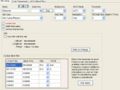
Site screen with bandplan

To access this screen, change the Site type to Mot Custom/Reband. If you are using the RR Trunk Import, and the 'Rebanded flag' has been turned on in the 'Database', FreeScan automatically adds the appropriate values into the table.
ProScan
BC296/796D

figure 1
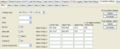
figure 2


- On the 'Database' Row, click on 'Trunk Bank Settings' (figure 1)
- Fill in the values as shown (figure 2)
DMA Scanners

figure 1
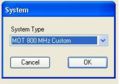
figure 2
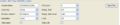
figure 3
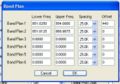
figure 4


- Below the Systems tab, hit 'Add' (figure 1)
- On the System pulldown, select 'MOT 800 Mhz Custom' (figure 2)
- In the System tree, click on the system name. Figure 3 results (partially shown to conserve space)
- Click on the 'Band Plan' button
- Fill in the data as shown (figure 4)
- Return to the Uniden DMA FAQ
- Return to the Uniden DMA Software Support article
- Analog Trunktrackers
- Handheld Scanners
- Mobile Scanners
- Uniden Scanners
- DMA Radios Hints and Kinks
- Software for Uniden Scanners
- Rebanding Supported Scanners
- Radio Models
- Digital Scanners with DMR
- Digital Scanners without DMR
- Digital Scanners with MOTOTRBO
- Digital Scanners without MOTOTRBO
- Digital Scanners without NXDN
- Digital Scanners with ProVoice
- Digital Scanners without ProVoice
- Uniden Scanner Features