Freescan Tools functions
From The RadioReference Wiki

Welcome to the Tools pulldown article.
Contents
System Quick Key Manager
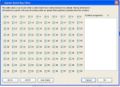
SQK Manager

Click on the image to expand
The System Quick Key (SQK) editor displays 100 keys because that's the maximum number of keys available on the 396, 996 and BCT15. However, the other DMA scanners don't have that many - and it's important to know this in order to avoid allocating a SQK that doesn't exist. Here's a quick reference on how many SQKs are available per scanner;
- SC230; 9 SQKs, numbered 1-9
- BC246; 10 SQKs, numbered 0-9
- BR330T; 99 SQKs, numbered 1-99
- BCD396; 100 SQKs, numbered 0-99
- BCD996; same as 396
- BCT15; same as 396
Frequency Fill

Use this function to repeat numerous frequencies in a sequence, enabling you to enter frequencies much more quickly.
Automatic Scanner Optimizer
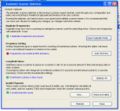
Optimizer screen

This new feature analyses your scanner's programming, pointing out anything that may be making it scan less efficiently then it could. These things include duplicate frequencies, unsorted frequencies, long hold times,and other settings that are often overlooked but can degrade scanner performance. You can then have it automatically correct everything by clicking on a button.
It will report how well your frequencies are sorted, since sorted frequencies scan faster. Its reported as a number between 0-100%, with 0-50% meaning your frequencies are basically unsorted. After clicking on Auto Sort, this figure will jump to 100%. If you then upload to your scanner, then redownload, it may drop slightly below 100% because of the way systems are sorted. This is normal and won't affect performance.
Duplicate Channel Finder
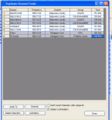
Example of output

To use on a site, place the cursor on the desired site in the System View (the white shaded area on the left). The Global setting searches all sites, systems and groups.
In either case, if any duplicate frequencies are found, they are presented in a formatted spreadsheet like screen as shown in the example
The duplicate talkgroup finder works similarly to the duplicate channel finder, but searches all systems for duplicate talkgroup IDs in all lists
Channel Lockout Manager

This function allows you to review any frequency or talkgroups that were locked out, and delete them if desired.
Other Selections
The lockout, unlock and check for update functions are self explanatory. Both the lockout and unlock functions ask for a confirmation before completing the task.
Return to the FreeScan User Guide